
 Add to Chrome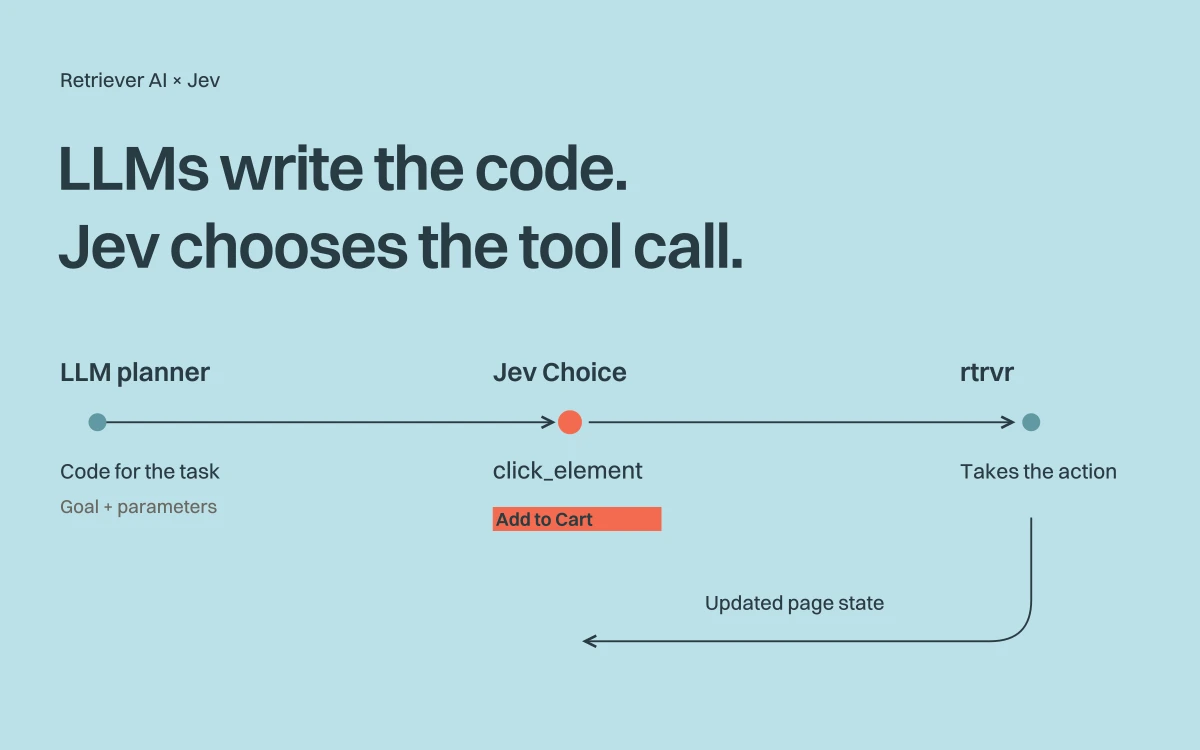
Jev inside rtrvr
The setup, real browser tasks, results, and tradeoffs of adding Jev to rtrvr.

Sending a LinkedIn message takes several steps: find the right profile, enter the message, click Send, and check that it appeared. A planner can write that procedure in advance. At each step, the browser agent still has to choose an action from the current page.
We added Jev, TypeSafe’s model for structured decisions, to the rtrvr (Retriever AI) harness for those choices. GLM continued to write the plan and handle steps that needed code or text generation. Jev received the current page state and a list of available actions, each with its tool parameters already filled in.
In our local LinkedIn and Amazon tests, the runs with Jev took 31% and 43% less time. They also cost 38% and 51% more. The baseline used inexpensive GLM Flash, and scoring large pages added more cost than we saved on GLM calls.
Here is how we connected Jev to the browser loop, what its choices looked like, and where we would improve the integration.
How to enable Jev
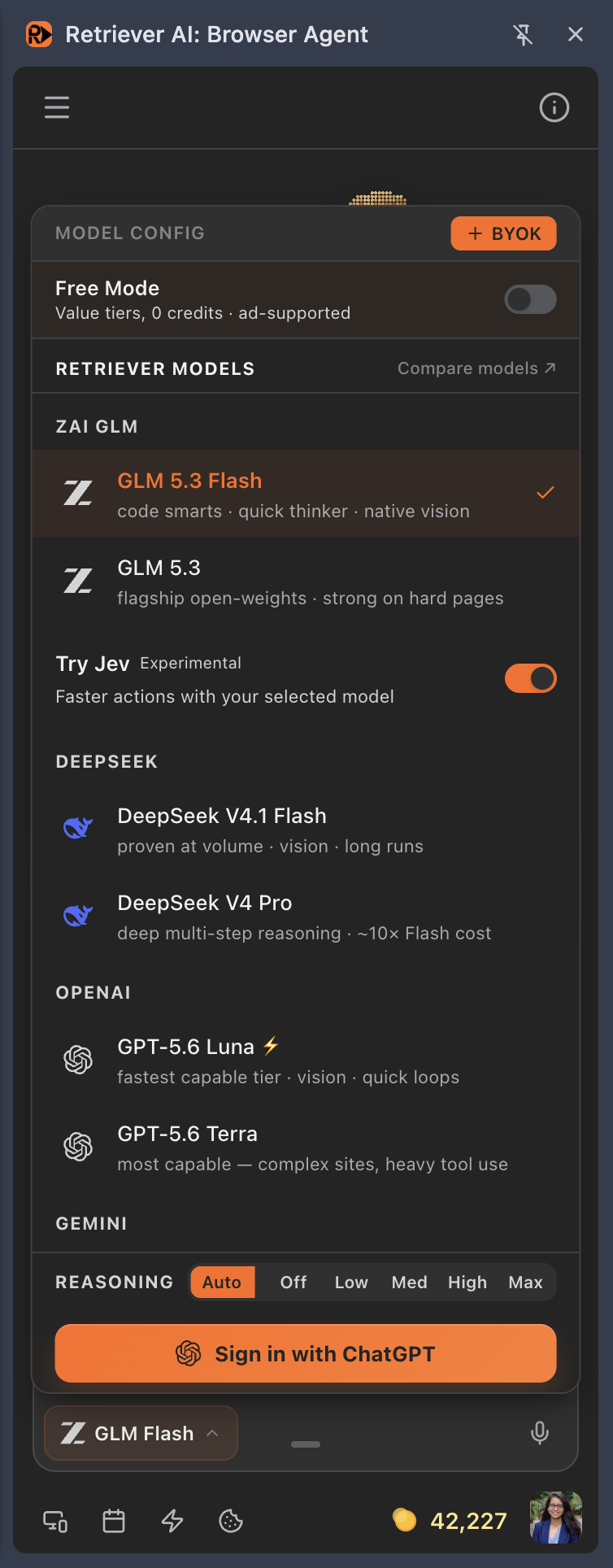
Open the Chrome extension side panel or rtrvr.ai Cloud. Click the model name beside the prompt box, then turn on Try Jev, marked Experimental. Keep your preferred model selected; Jev works alongside it.
1 Click the model name beside the prompt box.
2 Turn on Try Jev.
1 Click the model name beside the prompt box.
2 Turn on Try Jev.
The screenshots show Jev on. It is off by default, available in Free Mode and paid plans, and needs no separate TypeSafe API key. It is unavailable in Private Mode. If the switch is missing in the extension, update to 37.9.0 or later and reopen the side panel.
For the current controls, troubleshooting, and a video walkthrough, see the Jev setup guide. The released integration keeps the planner’s full prompt without Jev scoring. Oversized action requests can still use Score before Choice. The measurements below come from the earlier experiment; we have not re-benchmarked that change.
Try a task you can check
Start with a small website collection task or a practice form filled from a document. Both guides include a prompt, supplied inputs, and a reference result. Check the output before trying a larger task or allowing a submission.
Interactive Free Mode includes supported AI with a daily allowance. The experiment's provider-cost estimates below describe those recorded runs; they are not a bill for using the free plan.
Tasks ran faster with Jev
We tested two everyday browser tasks: send a LinkedIn message to a named contact, and add two products to an Amazon cart. The shopping request allowed any good shampoo under $30 and Tide Pods of any size. There was no checkout.
Both configurations used the rtrvr harness: each task ran once with Jev off and once with Jev on. All four runs used GLM 5.3 Flash through GMI as the generative model and the same local extension build. Jev resolved to jev-1.13.0.

These are elapsed times for the whole planner invocation, including browser actions and waits. The baseline ran first. The live pages and generated plans differed; Amazon selected different products and used different confirmation paths. These are four observed runs, not a controlled estimate of how much faster Jev makes every browser task.
GLM plans the task; Jev chooses the browser action
Jev returns typed decisions. It does not generate the code or prose needed to run an open-ended browser task. Its three question types let us ask for different decisions:
| Primitive | Answer | A useful browser-agent question |
|---|---|---|
| Choice | One option, probabilities over the options, and confidence | Which supplied action should execute next? |
| Score | An expected position on an ordered rubric, probabilities, and confidence | How relevant is this page region to the current step? |
| Noul | The probability of “yes” | Does the supplied evidence satisfy this requirement? |
These runs used Choice and Score. No Noul calls occurred.
Our code-as-plan loop stayed in place. GLM wrote the procedure. When the procedure called act, our browser agent received a bounded goal, such as finding the contact’s profile or adding the shampoo to the cart.
Our code built a menu from observed controls: click this element, type this exact message, choose this dropdown value. Jev selected an entry. It did not invent an element ID, write the message, or assemble new tool arguments.
TypeSafe calls the input state. We supplied the current goal, page content, recent action results, and exact values available for the action. The question defined the decision to make. State can be structured data or text.
Each action starts with the current page state
A small request goes directly to Choice. A large one gets one parallel Score pass, followed by one Choice call on the selected page sections and their available actions. If the step needs generation or repair, the existing model continues. An explicit delegate option lets Jev select that route.
The budget covers the whole serialized request: goal, history, questions, page content, and action options. We used 96,000 request bytes and 28,000 estimated input tokens as operating limits, with at most four Score requests in parallel. Those are our budgets, not TypeSafe’s exact context limit. One request estimated at 27,771 tokens reported 30,139 native input tokens, so the estimator needs headroom.
Context selection keeps the information needed to identify the right person or product, understand a failed action, and recognize when the task is already complete.
Across both assisted runs, all 50 Jev calls returned evaluated results. Eleven were Choice calls: seven selected browser actions and four selected delegate. rtrvr executed all seven selected actions. The handoffs came from Jev choosing delegate, not from API failures.
Three delegate choices led to completion answers. The shampoo act, for example, ended after adding the shampoo. It was not responsible for the next product. The planner then called a separate act with the Tide goal.
The remaining handoff occurred at the start of that Tide act. Its instructions already contained an Amazon search URL, but our Jev menu lacked direct URL navigation. GMI used that URL, then Jev resumed choosing actions on the new page. GMI used a capability outside the menu rather than choosing a better candidate from it. A known URL can go straight to the navigation tool in a future version.
Probability and confidence for each Jev action
We accepted the highest-ranked valid action without a fixed probability or confidence cutoff. rtrvr still checked the tool parameters and whether the action referred to the current page. When delegate ranked first, the existing model took over.
For each selected action, we logged its probability, the confidence of the Choice answer, and the leading alternatives:
| Selected action | Probability | Confidence | A competing option |
|---|---|---|---|
| Open the contact’s profile | 0.85 | 0.83 | Delegate: 0.08 |
| Type the message | 0.55 | 0.53 | Another typing candidate: 0.34 |
| Click Send | 0.95 | 0.94 | Delegate: 0.04 |
| Open a shampoo | 0.22 | 0.20 | Another click: 0.13; delegate: 0.14 |
| Add shampoo to cart | 0.97 | 0.97 | Delegate: 0.02 |
| Open Tide Pods | 0.22 | 0.21 | Another click: 0.21; delegate: 0.20 |
| Add Tide Pods to cart | 0.98 | 0.97 | Delegate: 0.02 |
Several options can satisfy the same goal
Add to Cart had a clear winner. Choosing a product was less certain: both product selections had a winning probability of 0.22. For shampoo, the runner-up was delegate at 0.14, a gap of 0.08. For Tide, another click had 0.21, a gap of just 0.01.
The confidence values were 0.20 for shampoo and 0.21 for Tide. The closer contest actually had slightly higher confidence. Confidence and the margin over the next option are different measures, so it helps to log both. Another typing candidate also had substantial probability, 0.34 against the winner’s 0.55.
Those alternatives were not tested and labeled. We cannot call them incorrect from their probabilities alone. Some may have been equally valid products or equivalent controls. A better evaluation would judge all leading candidates, group equivalent actions, and measure whether confidence predicts actual errors. A cutoff could reject useful actions as well as mistakes; these examples do not tell us where to set it.
There is one confidence value for each Choice answer, derived from the distribution over its options. Each option has a probability. Neither number establishes that the website accepted the action. TypeSafe explains this distinction in its confidence documentation.
Check the page after a confident choice
The LinkedIn Send action shows why. Jev selected Send with 0.95 probability and 0.94 confidence. The browser action result reported “no observable effect.” After rtrvr read the updated page, Jev delegated. GMI then reported that the exact message appeared in the thread with a timestamp and completed the task without sending again. We did not independently capture a final screenshot of the thread.
The two Amazon Add to Cart actions both had successful browser action results. Overall, the selected actions fit the tasks, and the handoffs fit the division of work. These examples are too few to establish a pattern or choose a threshold. We need more results with evaluated outcomes, including checks of the competing actions, to learn whether probability, confidence, or the gap between options helps predict mistakes. Then we can decide whether a threshold improves the agent or just adds unnecessary handoffs.
Jev scores page sections to select relevant context
Large pages can contain hundreds of links and controls unrelated to the current goal. Jev’s Score primitive rates each page section for relevance. Our harness uses those scores to select the sections and available actions to pass to Choice. The retained page text stays verbatim, with the information needed to identify the target, understand failures, and recognize completed work.
On the Amazon shampoo search page, Score and our selection rules reduced the menu from 591 actions to 82. On the next product page, it fell from 513 to 55.

Across accepted action-context selections, retained source bytes fell 90.0% on LinkedIn and 69.4% on Amazon, weighted by observation size. All ten action-context passes reported complete section coverage.
That reduction describes what reached Choice. Score first read the material being filtered, so these are not total token savings.
Jev’s context scoring raised total inference cost
Scoring page sections requires model calls of its own. In these runs, that extra cost exceeded what we saved by making fewer GLM calls.
GMI calls fell from 7 to 4 on LinkedIn and 8 to 5 on Amazon. The assisted runs added 39 Score calls and 11 Choice calls. Choice requests took 165–367 milliseconds each, excluding scoring, page capture, and browser execution. Score accounted for 78.7% of Jev’s estimated cost.

| Task | Jev off: total | Jev on: GLM | Jev on: Jev | Jev on: total |
|---|---|---|---|---|
| $0.02398 | $0.01835 | $0.01473 | $0.03308 | |
| Amazon | $0.03298 | $0.02275 | $0.02704 | $0.04978 |
One planner-context pass on LinkedIn was especially wasteful: four Score requests ran, but the result retained too much context, so we used the original prompt. The Amazon planner-context pass was accepted but removed only 21.3% of source bytes. We should avoid paying to score a page when the next model will receive almost the same context anyway.
Cached GLM input cost less than Jev input
We used GLM 5.3 Flash, an open-weight model, through GMI. These were the configured rates used to estimate our runs, in US dollars per million tokens:
| Model | Uncached input | Cached input | Output |
|---|---|---|---|
| GLM 5.3 Flash / GMI | $0.075 | $0.015 | $0.25 |
| Jev | $0.042 | No separate rate used | No output charge in our estimate |
Jev’s input rate was 44% below uncached GLM input, but 2.8 times the cached rate. The baseline also had more cache hits: 192,000 versus 81,472 input tokens on LinkedIn, and 261,376 versus 81,472 on Amazon. Fewer GMI calls did not translate into proportional dollar savings.
For price context, Anthropic lists Claude Opus 5 at $5 per million input tokens and $25 per million output tokens. That is a much more expensive call to replace. We did not run it in this experiment. Source: Anthropic’s model pricing.
Jev may save money when replacing calls to a higher-priced frontier model. That remains a hypothesis about the complete workflow: scoring overhead, cache usage, and the model’s behavior would all change the bill.
Here, rtrvr with Jev off cost less; rtrvr with Jev on finished sooner. Neither configuration beat the other on both. Cheap open-weight models make the cost side of this tradeoff demanding; Jev’s clearest observed benefit was speed.
Future work
1. Choose the right skill for the current task
rtrvr already has a skills harness. A site can have several complex workflows, each useful for a different goal. Matching the domain alone does not tell us which skill to load.
A promising next use for Choice is selecting the right existing skill:
- Code filters skills by site, availability, permissions, and required inputs.
- Jev sees the current goal, page state, and compact descriptions of the remaining skills: what each does, when it applies, and what result it promises.
- Choice selects one skill, or delegates if none fits. The harness loads the selected skill’s full instructions for the planner.
- The planner runs it, and the harness checks its result. Composition, new code, and repairs stay with the planner.
One routing decision could guide many browser actions. That may be a better use of Jev than asking it to reread a large page before every click. The selection could persist while the goal and relevant page conditions remain valid, then be reconsidered when the task stage changes or execution fails.
Jev skill selection is future work; it was not used in these runs.
2. Preprocess context and keep related content together
Our current chunker already preserves complete source lines and restores structural ancestors. It does not simply cut off the page at a token count. But line-based size limits can still split a product card, a form, or a conversation across regions.
The next version should preserve those units:
- Partition by subtree. Keep a product’s name, price, variant, and action together. Split an oversized subtree recursively, retaining its parent path and stable element IDs. Account for every source range so trailing content cannot disappear.
- Preprocess in code. Merge equivalent controls and repeated boilerplate where their meaning is preserved. Keep identity, failures, and completion evidence available even when their regions score poorly.
- Pack fewer, fuller requests. Budget shared state and question overhead as well as page text. Send only the batches needed, in one bounded parallel Score pass, followed by one Choice call. Parallelism can save time; it does not itself save tokens.
- Reuse only valid work. A cached score must match the region, goal, question, and relevant surrounding state. A new error or a sign of completion requires a new decision. Skip scoring when a cheap size check shows little room to reduce the prompt.
3. Evaluate when to accept a choice or delegate
We currently accept the highest-ranked valid action. To evaluate that policy, we need tasks with labeled outcomes, including cases where the top two actions are close. We can then compare accepting the winner with handing uncertain steps to the planner, measuring completion, extra calls, latency, and cost. Any threshold should come from those results. We should also check whether grouping equivalent controls makes the ranking easier to interpret.
Noul could answer a specific check on the page state, such as whether a required form value is present. It would return a probability, not an explanation of how to repair the plan. We would place it where such a check replaces existing work; an extra review after every action adds latency.
We would test skill routing, context preprocessing, and acceptance policies separately, repeating comparable tasks in both orders. That would show which change helped and whether it preserved the final outcome.
Repeated runs are needed to measure the gains
The sanitized data file includes per-call timing and cost estimates, token usage, menu sizes, context coverage, and leading Choice probabilities. It excludes page bodies, message text, account IDs, credentials, and private action arguments.
The experiment ran locally on September 16, 2026. Costs use provider-reported usage and the configured rates above, including every recorded Jev call. They are estimates, not invoices or public price guarantees. They exclude browser infrastructure, other tools, credits, and account-specific adjustments. Tokens from different providers are kept separate.
Jev became available in Cloud and extension version 37.9.0 on September 17. The released integration includes further changes; it has not been re-benchmarked here.
Timing comes from the extension’s monotonic planner-invocation timer and excludes pre-planner setup. Overlapping provider intervals count once in model wall time. All four invocations reported completion, with no failed model-provider attempts or missing usage records.
The Amazon runs chose different qualifying products and verified them differently: the baseline opened the cart, while the assisted run read Added to Cart pages. The LinkedIn message changed between runs. Final outcomes were described in model answers; independent screenshots and a controlled cart-reset record were not supplied. One run per configuration, baseline-first order, changing page state, and different cache usage limit the comparison.
We will keep the same division of work: GLM writes and repairs the plan, Jev chooses among actions available on the page, and rtrvr takes the action and reads the updated page state. The next step is to reduce repeated context reads, then measure whether that preserves the time savings at a lower cost.


