
 Add to Chrome
Open Secure logins in the Cloud sidebar, or the lock icon in the Relay extension. This is where you add, update, and remove the website accounts your cloud tasks can use.
Choose how to sign in
| You want to… | Use | What happens |
|---|---|---|
| Let Retriever sign in when a task needs it | Add login | Save the site's username or email and password. Retriever uses them on the site's sign-in page. |
| Use an account already signed in to Chrome | Sync from Chrome | Copy that site's current sign-in to Cloud. Only sites you add are synced. |
| Sign in yourself, including SSO or verification | Take control | Use the site's own sign-in page in the cloud browser, then continue the task. |
These work together. A task can reuse a saved session and use your saved password if the site asks for sign-in again. Chrome sync requires a paid plan. See plans for task and schedule access.
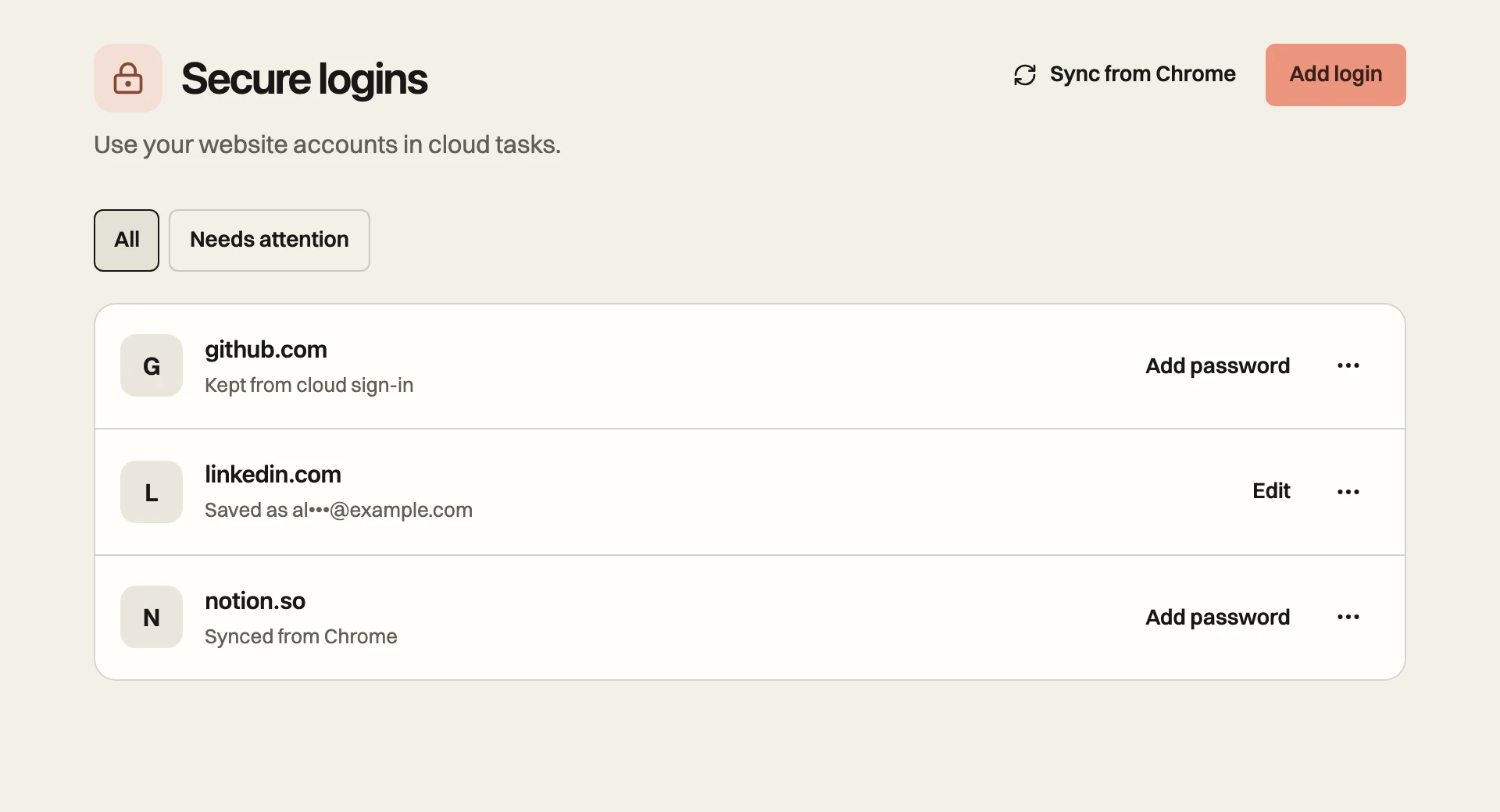
Saved logins
Save a password when you want Retriever to sign in for your tasks, including when a copied Chrome session stops working.
- 01
Open Secure logins and choose Add login. You can also choose Add login from the Logins menu below the Cloud prompt.
- 02
Enter the website, your username or email, and your password. If you use a named browser profile, select it before saving in Cloud. Relay saves to Default.
- 03
If the site uses an authenticator app, expand 2FA code (optional) and enter its setup key or setup link. This is the key used to generate codes, not a six-digit code that expires.
- 04
If the site has a separate sign-in page, add its URL under More options in Cloud, or Sign-in page (optional) in Relay. Choose Save.
When a task needs sign-in, Retriever tries the matching saved login. If the site rejects it, asks for an email or text code, or requires a CAPTCHA or passkey, the task pauses for you. A saved password cannot bypass the site's verification.
Sync from Chrome
- 01
Sign in to the website in the Chrome profile where Relay is installed. Use the same Retriever account in Relay and Cloud.
- 02
Open the lock icon in Relay. Under Sync from Chrome, enter the Website or URL and choose Add site. Allow Chrome access if prompted.
- 03
Check the site's status under Syncing from Chrome. Choose Sync now to send a fresh copy. The refresh button beside Saved in Cloud reloads that list; it does not start a new sync.
- 04
Open Secure logins in Cloud to review the site, then start your task with Default selected in the Logins menu.
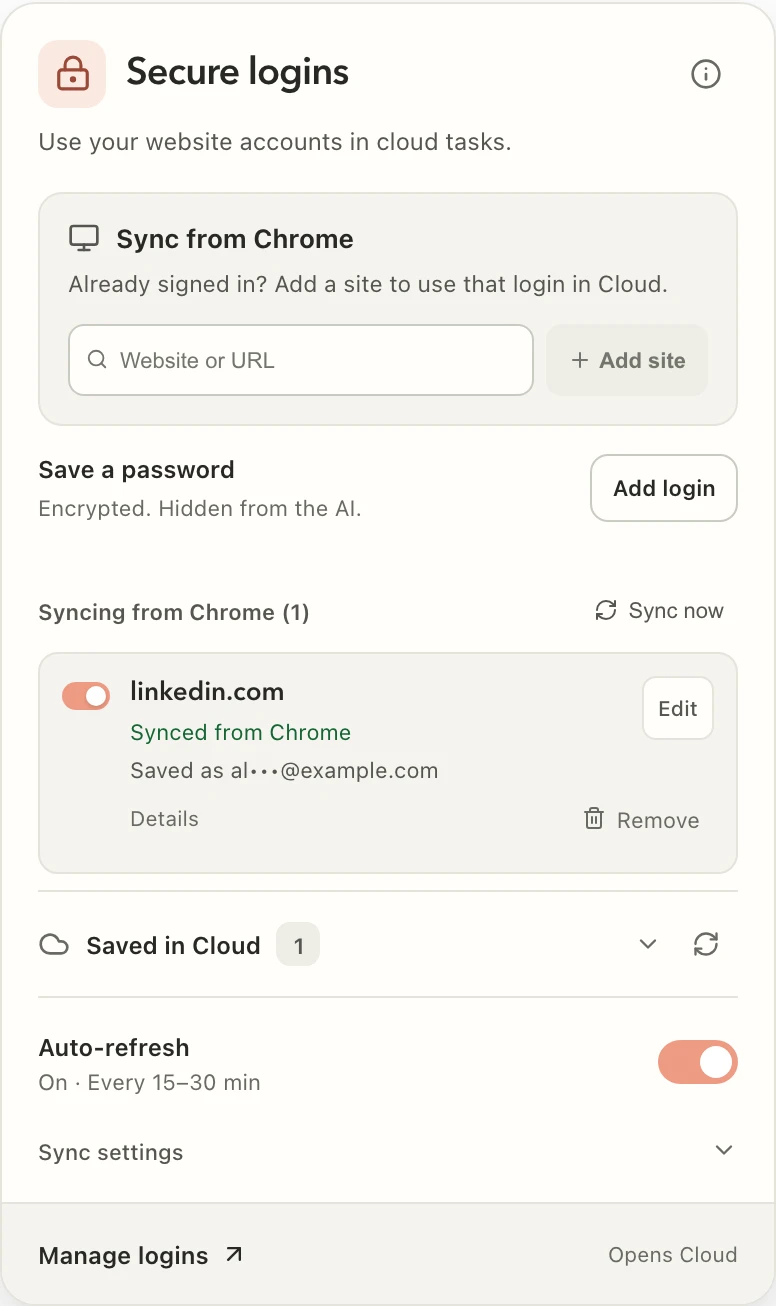
Auto-refresh
Auto-refresh turns on when you add your first site, unless you previously paused it. Auto (recommended) checks every 15–30 minutes. You can choose a different interval under Sync settings. Pausing Auto-refresh stops scheduled checks; login changes still sync for enabled sites while Chrome is open.
Chrome must be open to send updates. Cloud can use the last saved session while Chrome is closed, or sign in with a saved password when needed. A site can still expire or reject a copied session.
Chrome sync reads only the current Chrome profile and saves to Default in Cloud. For separate client or work accounts, use named browser profiles and add each account in its profile.
Sign in during a task
If a task pauses at sign-in, Review login lets you update a saved password. If none is saved, choose Add login, or Sync from Chrome when offered. Choose Continue after saving or syncing. Saving a password gives Retriever the details it needs to sign in; it does not sign the browser in by itself.
To sign in yourself, choose Sign in yourself or Take control and complete the site's sign-in in the cloud browser. Hand control back and continue. The task keeps its original instructions, URLs, and files, so you do not need to resend them.
Reuse a cloud sign-in
After a successful cloud sign-in, Retriever saves the site's cookies and supported browser storage for later tasks in the same profile. The next task restores that session. It does not need the same cloud browser or an open Chrome window.
For a daily task, choose the right profile and run the task once before scheduling it. Later runs reuse that profile's sign-in. If it expires, the agent can sign in again with a matching saved password. Verification or a rejected password can still pause a scheduled run. See Schedules.
No logins starts a task signed out and does not use your saved passwords. Sessions belong to your Retriever account and selected profile; another user allocated a cloud browser does not receive them.
Choose an account
You can save different accounts for the same site. Name the account in your task, for example, Use alex.work@example.com for LinkedIn. If the choice is unclear, Retriever asks. For recurring tasks that use different accounts on one site, keep each account in a separate profile.
Saving the same site and username or email in the same profile offers Update existing login. It does not silently overwrite the password. If older duplicate copies exist, the confirmation also offers to remove those copies while keeping the selected login. Other accounts stay separate. Similar masked email labels alone do not make two records duplicates.
Edit or remove access
| Control | What it changes |
|---|---|
| Edit | Update a saved login. The masked password means a password is already saved. Leave it unchanged to keep it; type a new one to replace it. |
| Delete login in the site's actions menu | Delete that saved password and setup key. An existing synced or cloud sign-in stays. |
| Remove sign-in in the site's actions menu | Remove that site's stored session from the selected Cloud profile. Its saved password stays. In Default, Cloud also asks the connected extension to stop syncing that site. |
| Remove in Relay | Stop syncing that site from this Chrome profile and remove its stored Default session. Saved passwords stay. |
| Disconnect Chrome under Relay's Sync settings | Revoke this extension's cookie access. Data already saved in Cloud stays until you remove it there. |
To stop future access to a site, remove both its saved password and its sign-in, and stop syncing it from any other Chrome profiles. Removing a sign-in does not cancel an active task. Cancel the task too if it should stop now. Signing in again deliberately can save a new session.
Privacy and storage
Saved passwords and authenticator setup keys use AES-256-GCM encryption and cannot be revealed from the login list. The list shows the site and a masked username or email.
Synced sessions are stored under your account. Default cookies are access-controlled but are not encrypted by the browser-profile key. Named profiles encrypt cookies and site sign-in state with their own key, protected by Google Cloud KMS. Saved passwords are encrypted separately in both cases.
A Workspace shares credits, not members' website logins. Deleting a named profile removes its stored sessions and saved passwords. Browser logins are also separate from app connections: a Google website login does not grant Drive file access. Use Connectors for that.
Troubleshooting
| What you see | What to do |
|---|---|
| The site still asks for sign-in | Check the selected profile. Review its saved password, sync a fresh Chrome session, or sign in with Take control. |
| Auto-refresh is paused | Turn it on in Relay if you want scheduled checks. A previous pause is remembered. |
| A verification request | Complete the site's code, CAPTCHA, passkey, or SSO step in the cloud browser, then continue. |
| More than one account | Choose the saved account or name its username/email in your task. Use separate profiles for recurring work. |
| A sign-in returns after removal | Check other Chrome profiles for sync and whether a saved password can sign in again. Remove both forms of access if neither is wanted. |